
How to Add a Link to TikTok Bio That Actually Gets Clicks in 2026
Learn how to quickly add a clickable link to your TikTok bio using the Website field, plus creative ideas to maximize clicks and keep full music access.
If you’ve spent any time on TikTok, you’ve heard creators say “link in bio” countless times. That tiny clickable URL sitting just below their profile description is often the gateway to their website, online store, YouTube channel, or latest project. For creators and businesses alike, figuring out how to add a link to TikTok bio is one of the first and most important steps toward turning viewers into customers, subscribers, or loyal followers.
Here’s the reality: TikTok doesn’t make this feature available to everyone right away. There are specific requirements you need to meet, and even then, the process isn’t always obvious.
In this guide, I’ll walk you through exactly what you need to know, from eligibility requirements to step-by-step instructions, plus creative ways to maximize that single precious link.
Why Do You Need a Link in TikTok Bio?
TikTok isn’t designed to send people away from the app. It wants users to keep scrolling, watching, and engaging. But as a creator or business, you need a way to turn that engagement into something tangible. A website visit. A sale. An email subscriber. That’s where your bio link comes in.
Without a clickable link, viewers who want to check out your product, read your blog, or follow you elsewhere have to go out of their way to find you. Most won’t. They’ll watch the video, think “that’s cool,” and keep scrolling. Adding a link removes that friction. It gives your audience a single tap to take the next step.
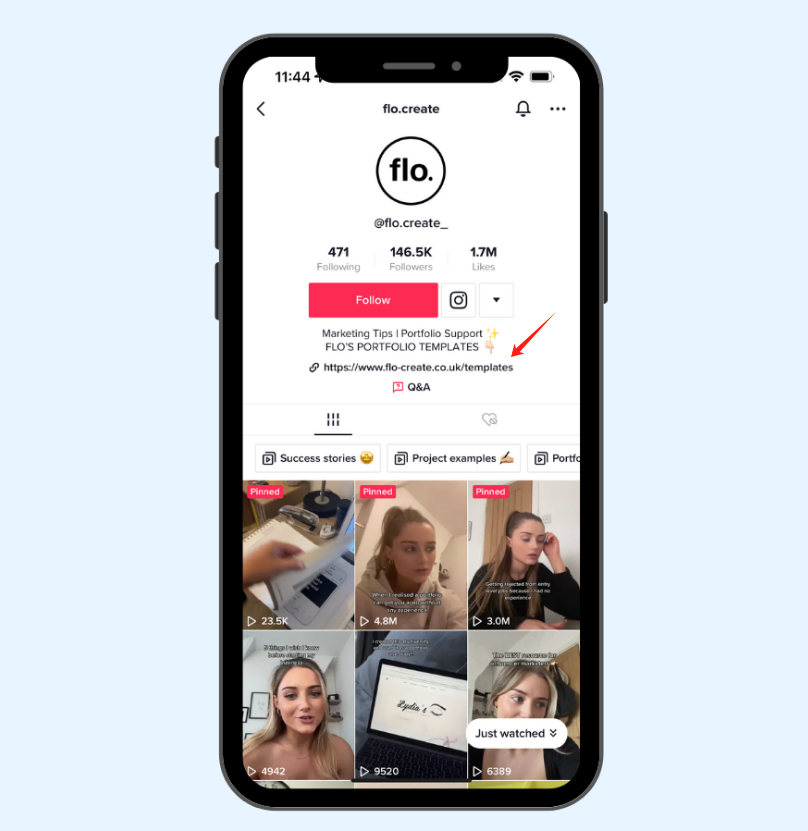
Beyond just driving traffic, a bio link helps you:
-
Move followers to platforms you actually own, like an email list or a website
-
Promote specific products, campaigns, or content without relying on the algorithm
-
Build credibility—a clean, clickable link signals you’re running a legitimate account
And if you’re serious about growing outside of TikTok, it’s non-negotiable.
Who Can Add a Link to Their TikTok Bio?
Not everyone has access to the clickable link feature. TikTok has two ways to unlock it, and you only need to meet one.
Option 1: Switch to a Business Account
If you convert your account to a business profile, you can add a clickable link immediately. No follower minimum. This is the fastest option if you’re a brand, entrepreneur, or creator who wants to start driving traffic right away. The trade-off? Business accounts have more restricted access to trending and commercial music. If your content relies heavily on popular sounds, this might not be the ideal route.
Option 2: Reach 1,000 Followers
If you prefer to stay on a personal or creator account, the bio link feature automatically unlocks once you hit 1,000 followers. This is the preferred path for many creators who want full music access while growing their audience.
One more thing: if you switch to a business account but have fewer than 1,000 followers, TikTok may ask you to complete business registration—like submitting a business license or tax info—before the link becomes active. This requirement has rolled out in several regions over the past couple of years.
How to Add a Link to TikTok Bio: Step by Step
Once you’ve confirmed you’re eligible, the actual process takes about 30 seconds. Here’s exactly how to add a link to TikTok bio using the mobile app. (This does not work from a desktop browser.)
Step 1: Open the TikTok App
Make sure you’re logged into the account where you want to add the link.
Step 2: Go to Your Profile
Tap the profile icon in the bottom right corner of the screen.
Step 3: Tap “Edit Profile”
You’ll find this button right below your bio and follower count.
Step 4: Find the Website Field
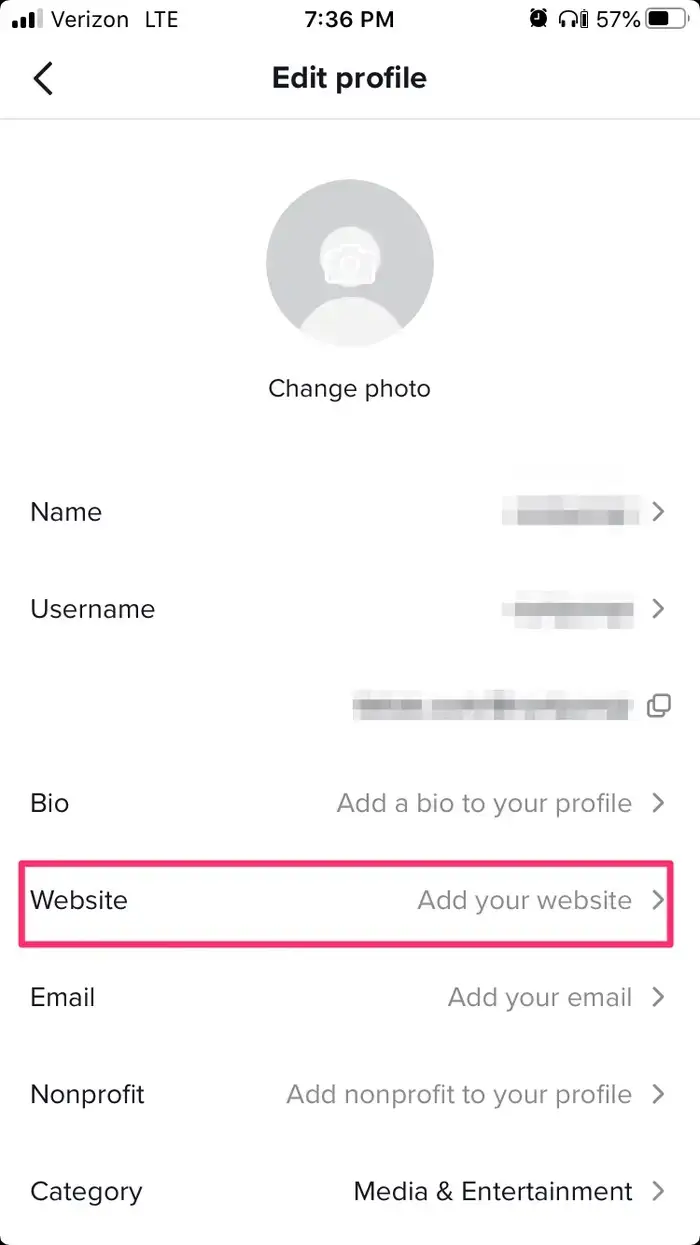
Scroll down until you see the “Website” section. If you’re on a business account or have 1,000 or more followers, this field will be visible. Tap “Add your website” or the Website field itself.
Step 5: Paste Your URL
Enter the full URL, including “https://”. If you’re using a short link or a branded URL, this is where it goes.
Step 6: Save
Tap “Save” in the top right corner. Go back to your profile and tap the link to make sure it’s working.
What If I Don’t See the Website Field?
If the Website field is missing, here are the most common reasons:
-
You’re on a personal account with fewer than 1,000 followers – keep growing your following or switch to a business account and complete registration.
-
You switched to a business account but haven’t completed business registration – go to Settings → Account → Switch to Business Account and follow the registration prompts. You’ll need your business license or tax ID.
-
You’re using a desktop browser – the link feature only works in the mobile app.
-
Your app needs an update – update TikTok to the latest version in your app store.
-
The feature isn’t available in your region – TikTok restricts bio links in some countries. Even if you meet the requirements, the option may not appear.
Alternative: Adding a Plain Text Link
If you don’t meet the requirements yet, you can still add a URL to your bio—it just won’t be clickable. Go to Edit Profile, paste your link into the Bio text field, and save. Viewers will need to copy and paste it manually. To make this easier, use a short, clean URL. Something like “yoursite.com/tiktok” is a lot more user-friendly than a long, messy link.
Creative TikTok Bio Link Ideas
Once you’ve figured out how to add a link to TikTok bio, the next question is: what should you actually link to? You only get one spot, so make it count.
Link to a Link-in-Bio Page: This is what most smart creators do. Instead of sending people to a single website, you create a landing page with multiple links—your store, YouTube channel, latest video, newsletter, and more. It gives you flexibility without constantly updating your bio.
Link to a Specific Product or Campaign: If you’re launching something new or running a limited-time sale, send people directly to that page. Don’t make them click through your homepage to find it.
Link to Your Newsletter Signup: Building an email list is one of the few ways to own your audience outside of social media. A direct signup link turns TikTok viewers into contacts you control.
Link to Your YouTube Channel: If you’re trying to grow on YouTube, use your TikTok bio to drive traffic there. Cross-platform promotion works.
Link to Press Features or a Media Kit: For personal brands, a link to press mentions or a media kit can open doors for partnerships, interviews, and speaking opportunities.
Why Choose Biovelt’s Link in Bio for TikTok
With so many link-in-bio tools out there, picking one can feel overwhelming. Biovelt is a completely free option that does a few things differently.
Most tools limit you to a handful of links unless you pay. Biovelt lets you add as many as you want. Whether you need to share your latest video, an article, a podcast episode, and a few affiliate products all in one place—you can.
Setup is straightforward. You don’t need any design skills. Pick from a selection of themes to match your style, and your page is ready in minutes. One feature that creators keep mentioning is the real-time link tracking. You can see exactly which links get clicked most often, which tells you what your audience actually cares about. That kind of insight helps you plan better content.
Tips for Getting More Clicks From Your TikTok Bio Link
Adding the link itself is only the beginning. The real goal is to encourage viewers to actually use it.
1. Mention the Link Inside Your Videos
Creators often place the CTA at the very end of a video, but mentioning it earlier usually performs better. If the link is important, reference it within the first few seconds while viewer's attention is highest.
Simple phrases like “Full guide in bio” or “Resources linked on my profile” work better than overly aggressive sales language.
2. Match Your Link to Your Current Content
Your profile link should align with the videos currently driving traffic. If your latest viral video discusses one product or topic while your bio link points somewhere unrelated, conversion rates usually drop.
Keeping the destination aligned with your recent content creates a smoother user journey.
3. Use Pinned Videos Strategically
Pinned videos can reinforce your bio CTA and help explain what users will get after clicking. This is especially useful for creators promoting digital products, courses, newsletters, or affiliate recommendations.
4. Keep Landing Pages Mobile-Friendly
Most TikTok users never leave their mobiles. If your landing page loads slowly, looks cluttered, or requires too many steps, people leave quickly. Fast-loading pages with clear buttons usually perform best.
5. Track Which Links Actually Perform
TikTok itself provides very limited bio link analytics. Using a tracked link or a platform with built-in click reporting helps you understand what your audience responds to most often. Over time, this data becomes useful for refining both your content strategy and your offers.
FAQs About Your TikTok Link in Bio
1. Does switching to a business account hurt TikTok reach?
Not directly, but business accounts have limited access to trending and commercial audio. For creators who rely heavily on trends and viral sounds, this can indirectly affect content performance and reach.
2. Should I use one permanent bio link or update it regularly?
A flexible link-in-bio page works best for most creators, but during launches or viral moments, directing traffic to one specific page usually converts better. Many creators combine both approaches by updating featured links based on current content.
3. Can TikTok suppress external links?
TikTok prioritizes keeping users inside the app, so outbound links naturally receive less visibility than native content. Strong CTAs and fast mobile landing pages are important if you want viewers to actually click.
4. Are link-in-bio pages bad for conversion?
They can be if they are overcrowded. Too many buttons create decision fatigue, especially for TikTok users who move quickly. Simple pages with a few focused links usually perform better.
5. What type of link works best for TikTok traffic?
Direct, high-intent pages usually convert best. Product pages, free resources, waitlists, newsletters, and pages connected to viral videos often outperform generic homepages.
Final Thoughts
Getting your link set up properly is one of those small technical tasks that ends up making a big difference. Whether you’re monetizing your audience, running a business, or just trying to build something beyond TikTok, knowing how to add a link to TikTok bio gives you a direct line to your audience.
If you meet the requirements, the process is simple: switch to a business account or hit 1,000 followers, then paste your URL in the Website field. If you’re not eligible yet, add a plain text link and focus on growing your following. And once you’re live, don’t waste that one link on a basic homepage. Use a link-in-bio tool to give your audience multiple ways to connect.
TikTok moves fast. When someone actually stops to check your social media profile, make sure you’ve given them a clear reason to click.