
How to Add a Link to Instagram Bio: Step-by-Step Guide 2026
This guide walks you through how to add a link to Instagram bio using both Instagram's native multiple links feature (up to five links) and link-in-bio tools for unlimited links and analytics.
If you've ever typed "link in bio" into your Instagram captions, you already know the struggle. That small space under your profile is the only place where Instagram lets you put a clickable link. It's valuable real estate, and how you use it can make or break your traffic.
Back in the day, adding a link was simple: you got one slot, and that was it. But Instagram has changed things up. Since 2023, you can now add up to five links natively. Still, even with that update, a lot of people aren't sure how to set things up properly—or whether they should stick with Instagram's built-in option or use a link-in-bio tool.
If you've been wondering exactly how to add a link to Instagram bio in 2026 without overcomplicating things, you're in the right place. Let's walk through everything step by step.
What Is a Link in Bio on Instagram?
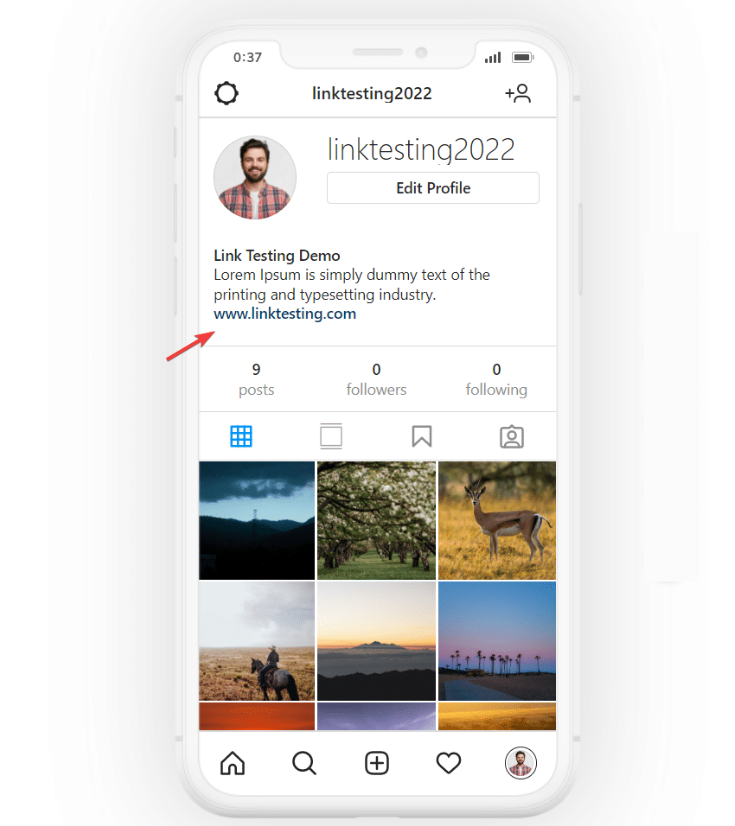
A link in bio is exactly what it sounds like—a clickable URL placed in the links section of your Instagram profile. It sits right below your bio text and is the only place on your profile where you can include a working hyperlink.
For years, Instagram limited profiles to a single external link. That forced creators to constantly swap URLs whenever they launched something new.
In 2023, Instagram expanded that limit to five native links per profile. The first link appears directly on your profile, while additional links are revealed when users tap to expand.
It’s a useful upgrade, but it still comes with limitations.
Native Instagram links don’t offer granular click analytics, A/B testing, custom layouts, or advanced branding controls. If you need more flexibility—or if your business depends on understanding audience behavior—third-party link-in-bio tools are still the stronger option.
Why Bother Adding Links to Your Instagram Bio?
If you're serious about growing an audience or selling anything online, adding links to your bio isn't optional. Here's why.
First, Instagram doesn’t allow clickable links in post captions. You can paste a URL, but it won't hyperlink. That means every time you want to send followers to a blog post, product page, or signup form, your bio link is your primary tool. Without it, you're just hoping people will copy and paste a URL manually—and most won't.
Second, your bio link is where you control traffic. Instead of sending people to a generic homepage, you can direct them exactly where you want them to go. Whether it's a new product launch, a newsletter signup, or a specific piece of content, you get to decide. And fewer clicks between a visitor and their destination means more conversions.
Third, having a well-organized set of links builds trust. When someone lands on your profile, they're deciding whether to follow you or engage further. A clean, easy-to-navigate link setup shows you’re professional, organized, and serious about what you do.
How to Add a Link to Instagram Bio (Step by Step)
Let's get into the actual process. Whether you're using Instagram's native links or a link-in-bio tool, here's exactly how to add a link to Instagram bio in 2026.
Step 1: Open Instagram and Head to Your Profile
Tap your profile picture in the bottom-right corner. That brings you to your profile page where your posts, bio, and existing links live.
Step 2: Tap "Edit Profile"
You'll find this button right below your bio text and above your Story Highlights. Give it a tap to open the editing screen.
Step 3: Scroll to the "Links" Section
Once you're in Edit Profile, scroll down until you see the "Links" option. If you've never added a link before, it'll be empty.
Step 4: Tap "Add External Link"
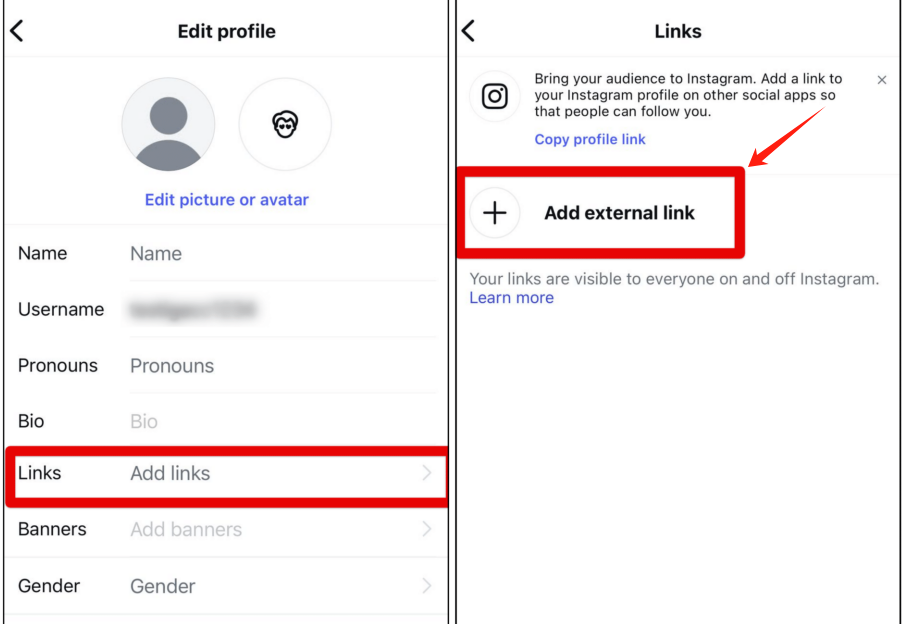
This opens up the field where you can paste your URL. Instagram lets you add up to five links here directly, no external tools required.
Step 5: Paste Your URL and Add a Title
Put your full URL into the field. Then add a title—this is the text that shows up as the button on your profile. For example, instead of showing a messy URL, you can label it "Shop Now" or "Read the Blog." If you skip the title, Instagram just shows the raw link.
Step 6: Save Your Changes
Tap the checkmark in the top-right corner to confirm. Your link will now appear on your profile. To add more, just repeat steps 4 through 6. Instagram shows your first link as the main button, and the others appear when someone taps it.
Step 7: Rearrange Your Links
You can reorder your links by tapping the three-line icon next to each one. Since the top link gets the most visibility, make sure your most important destination is first.
How to Add Multiple Links to Your Instagram Bio Using Link-in-Bio Tools
Instagram's five-link limit is fine for some people. But if you run a business, create content across multiple platforms, or just have a lot to share, five links fill up fast.
Link-in-bio tools solve that problem. Instead of filling up your Instagram profile with multiple URLs, you create a single landing page that holds all your links. Then you add that one URL to your bio. Anyone who taps it lands on your custom page and can pick from everything you offer.
Step 1: Pick a Link-in-Bio Tool
There are plenty of options out there in 2026. Some link-in-bio tools are free, and some charge monthly fees. Popular choices include Linktree, Beacons, and Shorby. If you want something completely free that gives you unlimited links and real-time click tracking, take a look at Biovelt. It's simple, doesn't ask for a credit card, and lets you see exactly what your audience clicks on.
Step 2: Set Up Your Page
Most tools follow a similar setup. Sign up, then start adding your links. You can usually:
-
Give each link a custom title
-
Add icons or images
-
Choose colors that match your brand
-
Rearrange links by dragging them around
The goal is to keep things organized. Instead of throwing every possible link onto the page, group them by category or highlight your top priorities. A clean, focused page gets more clicks than a cluttered mess.
Step 3: Add the URL to Your Instagram Bio
Once your page is ready, copy the URL it gives you. Then follow the same steps from the native method—go to Edit Profile, tap Links, and paste that URL as your first link. Now, when someone taps your bio link, they’ll see all your links in one organized spot.
Step 4: Track What's Working
One of the biggest advantages of using a link-in-bio tool is analytics. Most platforms show you how many clicks each link gets in real time. That helps you figure out what your audience actually cares about. If a link isn't getting clicks, swap it out for something more relevant.
Smart Tips for Making Your Bio Links Actually Work
Adding links is the easy part. Getting people to click them and actually take action takes a bit more strategy. Here are some practical tips that go beyond the basics and actually move the needle.
1. Put Your Most Important Link First
The top link gets the most visibility because it appears front and center. Any links after that require an extra tap, which means they get significantly fewer clicks. If you're running a limited-time sale, that should be your first link. Save your evergreen links—like your main website or portfolio—for the second or third spot.
Treat your link order like a mini content calendar: swap things out weekly based on what you're actively promoting. That way your bio never feels stale, and your audience always knows where to find your latest thing.
2. Use a Clear Call-to-Action
A link sitting quietly in your bio won't get clicked unless people know it's there. In your bio text, use the last line to point to your links with something simple like "Shop our latest drop 👇" or "Free guide below." The downward arrow emoji is universally understood as a signal to scroll down.
Don't stop there—mention your bio link in your posts and Stories too. When you post a new product, add "Tap the link in bio to shop this style." The more touchpoints you create, the more people will make the habit of checking your bio.
3. Keep Things Fresh
Outdated links frustrate your audience. If someone clicks expecting a sale you mentioned and finds it's over, you've lost trust and a potential customer. Set a reminder to review your links every two weeks.
Ask yourself: Does everything still make sense? Is anything I'm promoting no longer available? If you're using a link-in-bio page, remove links that aren't performing well. A page with five well-chosen, up-to-date links looks intentional. A page with ten random links looks cluttered. Less is often more.
4. Pay Attention to the Data
If your link-in-bio tool offers analytics, you have access to something most Instagram users don't: actual insight into what your audience wants. Look at which links get the most clicks. That tells you what your followers actually care about—not just what you think they care about.
If your newsletter link gets twice as many clicks as your shop link, that's a signal to lean harder into email marketing. Also, notice timing patterns. If clicks spike on certain days, schedule your important promotions around those windows. Let the numbers guide your decisions.
5. Consider a Custom Short Link
This small detail makes a surprising difference. A branded URL like yourname.link or link.yourbrand.com looks cleaner and builds more trust than a generic tool URL. When people see a branded link, it feels like your own property rather than a third-party tool.
If your link-in-bio tool doesn't offer custom domains, use Bitly or Rebrandly to create a shortened, branded link that forwards to your page. It takes a few minutes to set up and gives your profile a more polished, professional feel.
6. Think About the User Experience
When someone taps your bio link, what do they actually see? If you're using Instagram's native links, make your titles descriptive. Instead of "Website," use "Read Our Blog." Instead of "Shop," use "Shop Holiday Sale." Give people a reason to click before they even tap.
If you're using a link-in-bio page, group related links together and use images to make it visually scannable. Test your own link regularly—open it from someone else's phone or use incognito mode. Is it loading quickly? Is it obvious what to click next? A few minutes of testing can catch issues you wouldn't notice otherwise.
Common Questions About Adding a Link to Instagram Bio
How many links can I put in my Instagram bio?
As of 2026, you can add up to five links directly in your bio using Instagram’s native feature. If you need more than that, a link-in-bio tool lets you add unlimited links through a single URL.
Do I need a business account to add links?
No. Instagram opened the multiple links feature to everyone—personal, creator, and business accounts. Anyone can add up to five links, regardless of follower count.
Why don't I see the links option?
If you don’t see the Links section when editing your profile, check that your Instagram app is updated to the latest version. The feature rolled out in 2023, so older versions may not show it. Also, make sure you’re looking in the right place—it’s below your bio text in the Edit Profile screen.
Can I add a link to an Instagram Story?
Yes, and it works differently from your bio link. Instagram has a link sticker in Stories that any account can use. Just create a Story, tap the sticker icon, select “Link,” and paste your URL. It's a great way to drive temporary traffic to something specific without changing your bio.
Should I use Instagram's native links or a link-in-bio tool?
It depends. If you only have a few links and don’t care about analytics, Instagram’s native links are simple and free. But if you want unlimited links, click tracking, or the ability to update what you’re promoting without editing your bio every time, a link-in-bio tool is worth the extra step.
Can I see how many people click my bio link?
With Instagram's native links, no. You can't track clicks. Link-in-bio tools usually include analytics. Some, like Biovelt, show you real-time click data so you know exactly which links your audience engages with.
Wrapping It Up
Learning how to add a link to Instagram bio is simple.
Optimizing those links is where real growth happens.
Your bio link setup should evolve as often as your content strategy does.
If it hasn’t changed in a month, there’s a good chance it’s leaving traffic and conversions on the table.
Whether you use Instagram’s built-in links or a dedicated link-in-bio platform, the goal is the same:
Make it obvious where users should click next—and make that destination worth visiting.
A well-managed bio link doesn’t just send traffic.
It turns passive profile visitors into subscribers, customers, and long-term followers.